I was standing in my pajamas at 11:30 PM, shivering on the cold concrete of my garage and staring at a blinking red light that felt like it was mocking my life choices. My brand-new, high-end Level 2 charger was plugged into my car, but the utility company’s ‘Smart Rewards’ app was stubbornly insisting that my charger simply did not exist. I’d spent two hours trying to pair them, thinking I was some kind of tech-savvy homeowner, only to realize I was just a guy with a very expensive, very ‘dumb’ metal box on my wall. It’s a special kind of fury when you’ve bought the latest tech specifically to save money on your power bill, only to watch those off-peak savings vanish into thin air because of a handshake error between two pieces of software. The concrete was freezing under my slippers, and the wind was whistling through the gap in the garage door, yet there I was, refreshing a screen that refused to change.
Fix the Connection and Finally Get Those Off-Peak Savings
Today, we’re going to stop the cycle of restarting your router and swearing at your smartphone. I’ve been through the ringer with these setups, and more often than not, the issue isn’t your internet—it’s a specific set of hurdles involving firmware, local grid communication, and sometimes, even the way your charger was wired up. We’re going to walk through the exact steps to get your charger and your utility provider back on speaking terms. If you’ve been troubleshooting EV chargers for more than an hour, you know that the ‘restart’ button rarely solves the deep-seated sync errors. My goal is to move you past the basic ‘is it plugged in?’ advice and into the real-world fixes that actually work. I have learned the hard way that a simple connectivity problem can often be masked by complex-looking error codes that lead you down a rabbit hole of unnecessary repairs.
Is the Smart Charging Rebate Actually Worth All This Trouble?
You might be wondering if it’s worth the headache. Is the promise of cheaper electricity just a carrot on a stick? According to the U.S. Department of Energy, managed charging can reduce an EV owner’s fuel costs by up to 50% compared to unmanaged charging. That’s hundreds of dollars a year staying in your pocket. But if you can’t sync, you’re paying full price for every mile. Early on, I made the classic rookie move: I assumed any ‘smart’ charger would automatically work with any utility rebate program. I didn’t realize that some utilities require very specific Open Charge Point Protocol (OCPP) versions or that a slight code compliance issue during the physical installation could trigger a security lockout in the app. I even spent weeks wondering why my smart charger lost its wi-fi connection again, only to find out it was a signal interference issue caused by my old garage door opener. Have you ever sat in your car for twenty minutes trying to refresh an app that just won’t load? It feels like the tech is working against you. Many people don’t realize they can actually get the utility company to pay for your service upgrade if the sync is part of an official load-management program, but you have to get the communication right first. Let’s dig into the actual reasons your app is ghosting your charger and how to force a proper introduction before you lose another night of savings.
Force the Handshake and Secure the Connection
Think of your home Wi-Fi as a high-speed highway where your phone is a sports car, but your EV charger is a slow-moving tractor. Most modern routers broadcast on two bands: 5GHz and 2.4GHz. Your charger almost certainly lives on the 2.4GHz band because it penetrates thick garage walls better, but if your phone is stuck on 5GHz while you’re trying to ‘pair’ the two, they might as well be on different planets. I once spent an entire Saturday afternoon rebooting my router eight times before I realized my charger was actually ‘connected’ but couldn’t talk to the utility server because of a legacy security setting on my ISP’s gateway. I had to manually fix the EV charger connection by whitelisting the MAC address. The second I hit ‘save,’ the little blue light on the app turned green, and I felt like I’d just won the lottery.
Kill the 5GHz Signal for a Moment
If you are struggling to get the initial handshake to work, go into your router settings and temporarily disable the 5GHz band. This forces your phone and your charger onto the same 2.4GHz frequency. This is a classic fix when you find yourself wondering why your smart charger lost its wi-fi connection again. Once the utility app recognizes the charger, you can turn the 5GHz back on. It’s a simple trick that bypasses the ‘smart’ switching logic in modern routers that often confuses lower-bandwidth appliances.
Verify Your Firmware Version Manually
Manufacturers release firmware updates to patch security holes and improve communication with local utility grids. If your charger was sitting in a warehouse for six months before you bought it, the software is likely out of date. Check the manufacturer’s portal—not just the app—for a manual download. Sometimes the app fails to push the update because the connection is already unstable, creating a frustrating loop. Keeping your system updated is a key part of EV charger troubleshooting that most people ignore until the unit stops charging altogether.
Fix Physical Barriers That Block Communication
If your software is perfect but the connection still drops, the problem is likely physical. We often treat electricity like magic, but it’s more like plumbing. If there’s a kink in the hose, nothing flows. In the world of smart chargers, that ‘kink’ is often electromagnetic interference (EMI) or poor physical connections. I’ve seen setups where the charger was installed right next to a massive, unshielded freezer compressor. Every time the freezer kicked on, the Wi-Fi dropped. When ensuring code compliance when installing EV chargers, professionals look for these interference sources to prevent the exact ‘ghost in the machine’ errors you’re likely facing.
Hunt Down the Floating Neutral or Ground Fault
Sometimes the ‘sync’ error isn’t about the internet at all; it’s a safety lockout. Many smart chargers perform a self-check of the electrical circuit before they allow a data handshake with a utility server. If they detect a weak ground, they might stay in a ‘dumb’ state as a safety precaution. I’ve discovered that using the grounding trick that fixes intermittent charging errors can suddenly make the app start working again. It turns out the software was just waiting for the hardware to prove it was safe. Also, ensure you are using the specific torque wrench settings for a wall connector during installation. A loose wire doesn’t just cause heat; it creates electrical noise that can scramble the low-voltage data signals your smart charger relies on to tell the utility company you’re charging during off-peak hours. If your panel is ancient, you might even consider upgrading your panel for better EV charging performance to ensure a clean, stable power supply that won’t interfere with your sensitive smart home tech.
The biggest mistake I see—and even some experienced electricians make this one—is treating an EV charger like a standard household appliance. It isn’t. According to the National Fire Protection Association (NFPA) under NEC Article 625, an EV charger is classified as a ‘continuous load.’ This means it draws its full rated current for three hours or more, generating sustained thermal stress that most residential hardware was never designed to handle every single night. Most homeowners assume that if their panel says ‘200 Amps,’ they can simply add a 50-Amp breaker without a second thought. However, a truly expert installation requires a load calculation that accounts for that 125% multiplier. Without it, you are essentially redlining your home’s electrical system. I’ve seen 200-amp panels begin to sag and hum because the owner didn’t realize that upgrading your panel for better EV charging performance is about thermal overhead, not just physical space for a new breaker.
Does Your 200-Amp Panel Actually Need a New Ground Rod?
You might think your home is grounded perfectly because your lights don’t flicker, but modern smart chargers are incredibly sensitive to ‘dirty’ power. If your grounding system isn’t up to modern code, the charger’s internal safety relay may refuse to close the circuit, triggering a ‘connectivity error’ that is actually a hardware safety lockout. This is why your panel upgrade might require a new ground rod; it’s not an electrician’s upsell, it’s a technical requirement for the car’s onboard computer to verify safety before it accepts a charge. I’ve found that many ‘intermittent’ sync issues are actually just the charger protecting itself from a poor ground connection.
The Neutral Wire Trap That Kills Your Data Sync
Then there’s the ‘Oops’ factor that ruins more smart setups than lightning strikes: the the neutral wire trap that spikes your home utility bill. Many installers use a shared neutral or a sub-standard gauge wire because they think it only carries return current. In reality, a poorly sized or loose neutral creates harmonic distortion. This electrical ‘noise’ travels back through your home’s wiring and can interfere with your Wi-Fi router and smart hub. I’ve personally visited homes where the owner was ready to return a high-end charger, only to find out the installer skipped the forgotten torque test that prevents panel fires. Without the exact torque, those connections expand and contract with the heat, eventually vibrating loose and scrambling the low-voltage data signals your smart charger relies on.
If you’re currently troubleshooting EV charger connectivity problems, don’t just look at your router settings. Look at the permit and the physical wiring. If your installer didn’t walk you through how to verify code compliance for your EV charger installation, there’s a high chance they cut a corner that’s now ghosting your smart features. Have you ever fallen into this trap? Maybe you noticed a strange hum in the garage or your app only works at 2 AM? Let me know in the comments—I’ve likely seen your exact error code before and can tell you which screw is probably loose.
Invest in a $20 Infrared Thermometer Today
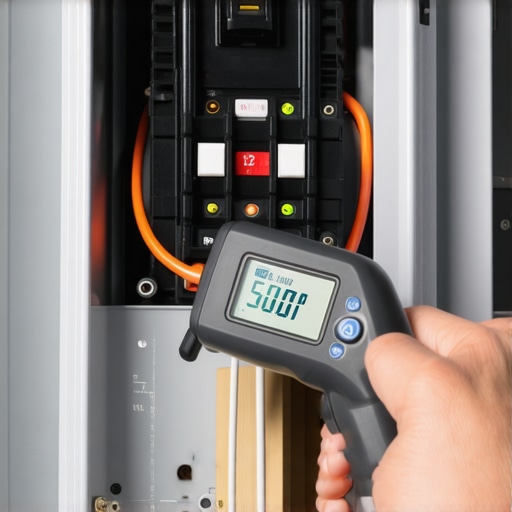
I realized recently that most of us treat our EV chargers like a toaster—we plug it in and expect it to work forever. But after seeing a neighbor’s unit melt its own housing because of a loose lug nut, I started carrying a cheap infrared thermometer in my toolbox. Once a month, while the car is pulling its full 48-amp load, I point that red laser at the breaker and the charger’s terminal block. If I see anything over 140°F, I know I’m heading toward a disaster. This is the ultimate pro-tip for EV charger troubleshooting because it catches physical failures before the software even knows there is a problem. If you see high heat, it’s usually because you didn’t use the specific torque wrench settings for a wall connector during the initial setup. Connections loosen over time due to thermal expansion, and a loose wire is a hot wire.
How do I keep my charging system healthy for the long haul?
Maintenance isn’t just about tightening screws; it’s about protecting the sensitive electronics from the environment. If you live near the coast, you need to understand the real lifespan of a level 2 charger in coastal salt air and consider applying a non-conductive dielectric grease to the plug contacts. I’ve seen chargers fail in three years simply because of microscopic corrosion that increased resistance. According to technical guidelines from the National Electrical Manufacturers Association (NEMA), periodic inspection of electrical connections is the only way to prevent high-resistance faults in continuous-load appliances. If you notice the handle feels warm or why your ev plug contacts look burnt, stop charging immediately. You might need to learn how to diagnose a faulty internal relay in your charging station before the unit becomes a permanent brick on your wall.
Your Garage is the Future of the Power Grid
Looking ahead, the ‘maintenance’ of your charger is going to shift from hardware checks to software management. We are moving toward a world of Vehicle-to-Home (V2H) technology, where your car doesn’t just take power—it gives it back during peak demand. This makes ensuring code compliance when installing EV chargers even more critical, because your wiring will be handling two-way traffic. I predict that within five years, your charger will use AI to run its own ‘forgotten torque test’ by measuring micro-fluctuations in voltage. Until then, you are the diagnostic tool. If you haven’t done it yet, I strongly encourage you to grab a screwdriver and how to verify code compliance for your ev charger installation by checking the tightness of your breaker connections. It takes five minutes and could save your house from a thermal event. My goal is to make sure your smart charger stays smart, and more importantly, stays cool. If you are still seeing those annoying sync errors, don’t just reboot—check the physical health of the wire first.
What I Finally Figured Out About My Home’s Invisible Limits
After months of tinkering, I realized that my EV charger troubleshooting journey wasn’t really about the app at all. It was about the electrical foundation. One major lightbulb moment was discovering that a software lockout is almost always a hardware warning in disguise. If your app won’t pair, don’t just blame the cloud; learning how to detect a loose neutral wire before your electronics fry is a skill that saves both your charger and your home’s sensitive circuitry. I also learned that upgrading your panel for better EV charging performance isn’t just about capacity—it’s about providing a ‘quiet’ electrical environment where data can travel without interference. Most of my early frustration came from expecting a 1980s electrical panel to handle a 2025 data handshake.
Building Your Charging Confidence Toolkit
You don’t need to be a master electrician to keep your system healthy, but you do need the right gear to verify the work. First, get a decent torque wrench to ensure why your charger needs a specific torque setting to pass inspection isn’t just a hurdle, but a safety standard you’ve personally met. Second, keep a digital copy of the code compliance essentials for EV charger installations in 2025 handy to cross-reference any work done by third-party contractors. Finally, an infrared thermometer is your best friend for spotting thermal stress before it becomes a fire hazard. I trust these tools because they move the conversation from guesswork to hard data, which is the only way to win with smart technology.
Take Control of Your Garage and Your Savings
Standing in the garage at midnight might feel lonely, but you’re actually at the forefront of a massive energy shift. By mastering your setup, you aren’t just saving a few cents on off-peak power; you’re building a reliable, high-value asset. Remember that the real reason your home value increases with a pro EV setup is the peace of mind that comes with a safe, code-compliant installation. Don’t be afraid to dig into the settings or double-check the physical wiring. You’ve got the knowledge now, and the savings are waiting on the other side of that solid green light. If you hit a wall that software can’t fix, you can always reach out for professional guidance to get back on track. Have you ever had a smart charger that refused to talk to your utility app? What was the specific fix that finally worked for you? Let me know in the comments below!