The wind was howling through the gaps in my garage door, and there I was, shivering in my slippers at 2:00 AM, staring at a silent Wallbox. I had everything perfectly planned. I had set my car to start charging at midnight to hit those sweet off-peak rates, and I had programmed my smart charger to do the exact same thing. Instead of a full battery, I found a car that was ‘asleep’ and a charger that looked like it had given up on life. It was a digital standoff. My car was waiting for the charger to say ‘go,’ and the charger was waiting for the car to ‘request’ power. They were like two polite people stuck at a four-way stop, and neither would move. I’ve been there, and if you’re reading this, you’re probably there too. Today, I’m going to help you break that deadlock so you can actually sleep through the night and wake up to a full range.
My Garage Floor is No Place for a Midnight Tech Support Session
I made a classic rookie mistake when I first brought home my Level 2 unit. I thought ‘the more scheduling, the better.’ I had the car’s internal app, the Wallbox app, and even a third-party utility app all trying to manage the same stream of electrons. It was a disaster. I ended up seeing why your cars charging port is flashing yellow more often than I saw a solid green light. The reality is that these systems often use a J1772 communication protocol that can get incredibly confused when two different ‘brains’ try to set the rules. According to the U.S. Department of Energy, while finding the best time of day to charge your car for the lowest utility rate is critical for your wallet, having conflicting timers can lead to a ‘waiting’ state that never ends. I spent weeks troubleshooting ev charger connectivity problems before I realized that I was my own worst enemy. You don’t need three masters for one circuit. It’s about creating a hierarchy of command.
Does a ‘Smart’ Charger Just Make Life More Complicated?
It’s a fair question. You pay hundreds of dollars for a smart unit, and then it won’t even kick in when it’s supposed to. If you’ve ever looked at your phone and wondered why your charging station is stuck in waiting mode, you aren’t alone. The skepticism is real. We’re told these tools are meant to simplify our lives, yet here we are acting like amateur electricians and software engineers just to get to work in the morning. Have you ever woken up to find your car didn’t charge because of a simple software glitch? It’s infuriating. But there is a logic to the madness. Once you learn how to use an app to schedule charging and save on your bill without tripping over your car’s own internal settings, it’s a game changer. We just have to decide who is in charge: the vehicle or the wall. Let’s get into the nitty-gritty of why these two components fight and how you can finally pick a winner.
Pick One Boss and Kill the Other Timers
The biggest hurdle I faced wasn’t a broken wire; it was a conflict of interest between two smart devices. When your car has a “start charging at 1 AM” rule and your Wallbox has a “power on at 2 AM” rule, you’ve created a logic trap. The car wakes up at 1 AM, sees no power, and goes into a deep sleep to save its 12V battery. When the charger finally clicks on at 2 AM, the car is already snoring and doesn’t respond. The fix is simple: disable all schedules in the vehicle’s infotainment system and let the wall unit handle the timing. By centralizing the brain, you avoid the scenario where why your smart charger app is giving you wrong data because the car refused the handshake. I once spent three hours on a Sunday afternoon tearing apart a NEMA 14-50 outlet because my car stayed in ‘Waiting’ mode, only to realize I had a ‘ghost schedule’ active in a third-party utility app I’d forgotten I installed. The car was waiting for a signal that would never come from a server that was down. This taught me that how to use an app to schedule charging and save on your bill only works if there is exactly one master in the relationship. #IMAGE_PLACE_HOLDER_B#
Break the Infinite Loop with a Hardware Handshake
If you’ve cleared the schedules and you’re still seeing that dreaded “waiting” status, you likely have a physical handshake error. The J1772 protocol requires a series of low-voltage signals to confirm a secure connection before the high-voltage relay clicks. I remember a humid Tuesday night when I was convinced my Level 2 unit had fried its motherboard. I was already looking up upgrading your panel for better ev charging performance, thinking the load was too much for my home. It turned out to be much simpler. The plug wasn’t fully seated because a tiny piece of road grit had wedged into the car’s port. This minor physical gap prevented the “proximity pilot” pin from confirming a safe connection. Before you dive into deep software menus, how to stop your charger handle from sticking in the port and cleaning the contacts with a blast of compressed air can solve the “waiting” ghost. If the hardware is clean and the software is synced, but the car still won’t drink, you are likely facing how to troubleshoot a communication error between your car and charger.
Check the Panel Before Blaming the Software
Sometimes the “waiting” isn’t the car’s fault or the charger’s fault—it’s the house saying no. Many smart chargers perform a self-test before allowing current to flow. If they detect a voltage drop or a floating neutral, they will stay in a standby state to prevent a fire. I once saw a client who thought their charger was broken, but in reality, they were experiencing the real reason your circuit breaker trips at 90 percent charge: an old, undersized breaker was overheating and throttling the connection before it even started. You should also look at ev-charger-troubleshooting-expert-tips-for-common-issues to ensure your firmware is actually up to date. An outdated charger might not speak the same language as a brand-new car’s updated software. Check your physical connections, simplify your apps, and ensure your home’s electrical backbone is actually capable of pushing the amps you’re asking for.Let’s dig a bit deeper into that electrical backbone, because this is where the most expensive mistakes and frustrating delays happen. I constantly hear ‘experts’ on social media telling every homeowner that if they have a 100-amp panel, they absolutely must spend five thousand dollars on a full service upgrade before they even think about an EV. In my experience, that’s often a lazy, one-size-fits-all answer. You can frequently find smart ways for how to add an ev charger without a 200 amp panel upgrade by utilizing modern energy management systems. Instead of ripping out your entire electrical service, you can look into how to use load shedding devices to avoid a full service upgrade. These devices monitor your home’s total draw and temporarily pause the car’s charging if you turn on high-draw appliances like the oven or the dryer at the same time. It’s a sophisticated, code-compliant workaround that keeps your house safe without the massive contractor bill.
Stop Overpaying for Service Upgrades You Don’t Need
The reality is that most homes don’t use their full electrical capacity 98 percent of the time. If you skip the hidden cost of skipping a panel load calculation, you might be over-engineering a solution for a problem you don’t even have. However, there is a dangerous ‘oops’ factor that many DIYers and even general electricians miss: the physics of high-continuous loads. The National Electrical Code (NEC) defines an EV charger as a continuous load, meaning it can run at max capacity for three hours or more. This is fundamentally different from a toaster or a microwave. Because of this, circuits must be sized at 125 percent of the load to handle the constant thermal stress. When you ignore the real reason your circuit breaker trips at 90 percent charge, you are fighting a losing battle against heat. This leads to a massive trap: improper terminal torque. According to the NFPA 70 (NEC) Section 110.14(D), installers are legally required to use a calibrated torque tool for all terminations. If those lugs aren’t tightened to the specific torque settings that prevent panel fires during high load charging, the intense heat from a 48-amp draw will cause the metal to expand and contract until the connection physically loosens. #IMAGE_PLACE_HOLDER_C#
Is Your Electrician Actually Using a Torque Wrench?
It sounds like a small detail, but it’s the difference between a safe garage and a melted panel. I’ve seen countless cases of troubleshooting ev chargers common compliance pitfalls and fixes where the root cause of a ‘waiting’ status was simply a loose wire that ‘felt tight’ to the hand but failed under load. This is why ensuring code compliance when installing ev chargers isn’t just about passing a city inspection; it’s about long-term thermal stability. When you are how to find an electrician who actually understands ev codes, ask them if they carry a digital torque screwdriver. If they look at you like you have three heads, find someone else. Have you ever fallen into this trap or been told you needed a massive upgrade you weren’t sure about? Let me know in the comments—I’m curious to see how many of you were pushed toward an expensive service change when a load-management fix would have sufficed.
The Five-Minute Thermal Check That Saves Your Breaker
I’ve learned the hard way that “done” doesn’t mean “forever safe” when it comes to high-amperage charging. One tool I swear by—and every EV owner should have—is a simple handheld infrared thermometer. It sounds like overkill until you realize that why your breaker gets hot to the touch during charging is often the only warning sign you get before a total equipment failure. I make it a habit once a month to point that little red laser at my EV breaker while the car is pulling its full load. According to the Tesla Wall Connector Gen 3 Installation Manual, terminal connections must be torqued to exactly 50 lb-in (5.6 Nm) to prevent thermal runaway and internal damage. If I see my temperatures climbing north of 60°C (140°F) at the breaker casing, I know my torque has likely slipped or the breaker is internally failing. Learning how to spot a dying breaker before it shuts down your charging session can save you from an expensive middle-of-the-night emergency visit from an electrician.
How do I maintain my home charging setup over time?
Maintenance isn’t just for the car’s tires and wipers; your charging hardware needs a seasonal “health check” too. For your physical unit, it’s about integrity and cleanliness. Every three months, I inspect the charging handle for road grit, spider webs, or bent pins. If you live in a region with harsh winters, following 3 maintenance tasks that keep your outdoor charger running through winter is absolutely non-negotiable for longevity. Beyond the physical, you must manage the software. Manufacturers frequently release over-the-air patches that optimize the communication “handshake” between the vehicle and the wall unit. If you ignore how to update the firmware on your smart charging station, you’re missing out on vital safety protocols and potentially more efficient charging curves. 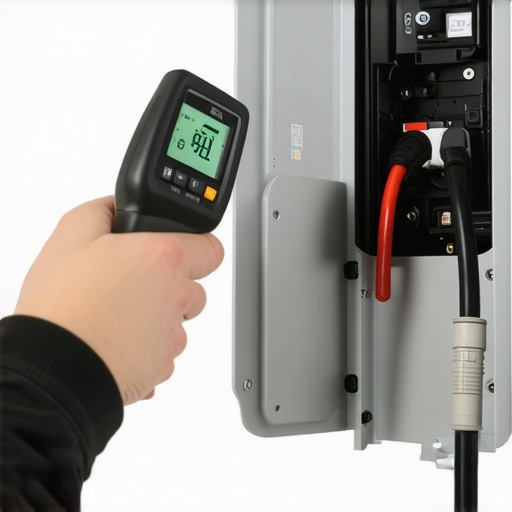
Software Is the New Oil Change
We are rapidly entering an era where your car won’t just take power; it will act as a battery for your entire life. Looking at the trend lines for 2025 and beyond, I see Vehicle-to-Home (V2H) and Vehicle-to-Grid (V2G) technology becoming the standard. This means your home’s electrical panel won’t just be a one-way street anymore. This is why upgrading your panel for better ev charging performance now is a strategic play—you’re preparing for a world where your car powers your house during a utility blackout. If you’re planning on adding a second vehicle to the family fleet soon, you’ll also need to master how to balance multiple EVs on a single home circuit to avoid overloading your existing service. Stay ahead of the curve by treating your charger as a dynamic piece of smart technology, not just a fancy extension cord. I’m telling you, go buy that $20 IR thermometer today. It’s the cheapest insurance policy you’ll ever own for your garage. Check those panel temps after an hour of charging—it’s a simple test that gives you total peace of mind.
The Hardest Lessons My First Home Install Taught Me
After years of tinkering with these systems, I’ve realized that the most frustrating problems are rarely about the car being “broken.” They are usually about communication. First, never trust a standard outlet for high-speed needs; I learned quickly how to pick a nema 14-50 outlet that wont melt under pressure because the cheap ones just aren’t built for a 10-hour marathon of electricity. Second, software updates are your friend, not a chore. If things feel glitchy, you should check ev-charger-troubleshooting-expert-tips-for-common-issues to see if a simple firmware flash can fix the handshake. Finally, keep it simple. The more apps you have “managing” your charge, the more likely you are to wake up to an empty battery.
Tools That Make You Look Like a Pro
You don’t need a van full of gear to keep your system running, but a few specific items are non-negotiable for my peace of mind. I always keep a canister of electronic contact cleaner nearby; it’s the best way to ensure road grime doesn’t cause a physical “waiting” error. I also suggest bookmarking a guide on how to verify code compliance for your ev charger installation so you can double-check your electrician’s work (or your own). If you’re planning for the future, start researching panel upgrades for ev chargers what you need to know now, so you aren’t rushing into a bad deal when you buy your next EV.
Take Charge of Your Garage with Confidence
#IMAGE_PLACE_HOLDER_E#
Transitioning to electric driving is supposed to be a joy, not a source of 2:00 AM anxiety. By streamlining your software, respecting the thermal limits of your hardware, and knowing how to fix a check charger warning on your cars dashboard, you’re turning a complex machine into a reliable appliance. You’ve got the knowledge to handle EV charger troubleshooting and panel upgrades like a seasoned veteran. Don’t let a “waiting” light dim your excitement for the electric future—you are the one in the driver’s seat now. Have you ever had your car and charger get into a “digital standoff” where neither wanted to start first? Let me know your story in the comments below!