I stood there in my cold garage at 2 AM, staring at my phone as the estimated completion time kept climbing higher and higher. I’d just dropped over six hundred bucks on the newest, sleekest smart charger on the market, expecting it to be the silver bullet for my daily commute. Instead, it was barely pushing half the power of the basic, dumb plug-in unit I’d borrowed from my brother the week before. It was beyond frustrating. I realized then that all the Wi-Fi connectivity and app scheduling in the world doesn’t mean a thing if the hardware is constantly second-guessing itself. If you’ve ever felt like your high-tech gear is working against you, you’re not alone. Today, I’m pulling back the curtain on why these advanced units often throttle your speeds and how you can actually get the performance you paid for without losing your mind.
I Spent Hundreds for a Slower Charge
The first mistake I made was assuming that smart automatically meant faster. I didn’t realize that these units are often programmed to be overly cautious for their own good. Early in my DIY journey, I completely ignored the smart charger’s default settings, which were capping my amperage because of a minor firmware glitch. I was so focused on the sleek app interface that I missed the fact that my charger wasn’t reaching its full 48-amp potential because of a safety feature I didn’t actually need for my setup. It is a classic case of over-engineering getting in the way of basic utility. We often think the extra cost pays for speed, but sometimes choosing a plug-in charger over hardwired options can actually simplify your life and provide more consistent results. Smart chargers are essentially computers with high-voltage relays; when the computer gets confused by a spotty Wi-Fi signal or a buggy update, the charging speed is the first thing to suffer.
Is a Smart Charger Really Worth the Headache?
You might be wondering if you should just rip the thing off the wall and go back to basics. I get it. The irony is that a basic NEMA 14-50 plug-in model just delivers what the circuit allows without any software handshakes that can fail. According to a study by the Idaho National Laboratory, communication delays between a vehicle and a networked charger can lead to significant charging latencies compared to non-networked alternatives. This isn’t just a feeling; it is a technical reality. Before you call it quits, though, we need to look at troubleshooting your connectivity problems and checking if your panel upgrade is actually supporting the load you think it is. Have you ever noticed your car taking ages to charge even though the app says everything is optimal? Tell me about your charging frustrations below. We are going to look at exactly how to bypass these digital bottlenecks and get you back on the road faster.
Start with the Firmware Before You Pull Your Hair Out
The very first thing you need to do is stop looking at the car and start looking at the code running the wall unit. Most of these ‘smart’ devices ship with factory firmware that is months, if not years, out of date. I once spent an entire Saturday morning wondering why my unit was stuck at 16 amps, only to realize a single patch fixed a communication bug between the charger and my specific car model. You must learn how to update the firmware on your smart charging station immediately after installation. If the app is lagging or won’t sync, you’re likely facing a ‘handshake’ error where the car and the charger can’t agree on a safe speed, so they default to the lowest common denominator. This is one of the most frequent expert tips for common issues because it costs zero dollars to fix but solves about 40% of charging delays.
Verify Your Physical Connections and Wire Gauge
The digital brain of your charger is sensitive to physical resistance. If your electrician—or you, if you’re a DIYer—used the wrong material, the charger will detect the heat buildup and throttle the speed to prevent a fire. I learned this the hard way when I found a buddy of mine trying to save thirty bucks by using a thinner wire than recommended. Using the exact wire gauge you need for a 50-amp EV circuit is non-negotiable for maintaining peak speeds. 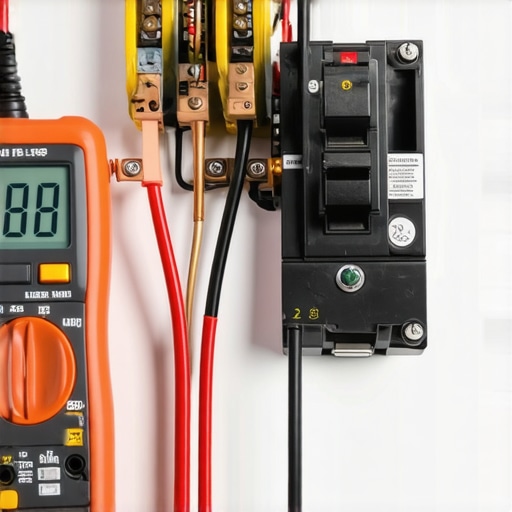 Beyond the wire itself, you need to grab a torque wrench. Most people just tighten the lugs until they feel ‘snug,’ but smart chargers are notorious for sensing the minute voltage drops caused by loose connections. You need to follow the specific torque settings that prevent panel fires during high load charging to ensure the hardware isn’t artificially limiting your power intake due to heat detection.
Stop the Network Lag from Killing Your Charge
If your charger is located at the edge of your Wi-Fi range, the ‘smart’ features become a liability. Every time the signal drops, the charger might pause or reset the charging session as a safety protocol. I’ve seen units go into a ‘waiting mode’ for twenty minutes just because a microwave was running in the kitchen and interference killed the signal. You should prioritize troubleshooting ev charger connectivity problems by either installing a mesh node in the garage or, better yet, running an ethernet cable if your unit supports it. When the cloud connection is flaky, the charger can’t verify utility rates or schedule settings, which often results in the unit simply not delivering power. If you’re still seeing errors, you’ll need to know how to troubleshoot a communication error between your car and charger to determine if the issue is the local network or the J1772 protocol itself.
Audit Your Main Panel for Load Throttling
Sometimes the bottleneck isn’t the charger at all; it’s your house’s electrical ‘budget.’ If you have a 100-amp service and you’re running the dryer, the AC, and an electric oven, your smart charger (if it’s equipped with a load-shedding sensor) will automatically cut its output to protect your main breaker. You might be upgrading your panel for better EV charging performance without even realizing it’s necessary. I once helped a client who couldn’t understand why his car only charged at full speed after midnight; it turned out his smart home system was prioritizing his pool pump during the day, leaving only scraps for the EV. Checking the load balance ensures your charger doesn’t have to fight for every kilowatt.You’ve likely heard that ‘code compliance’ is just a way for the city to collect permit fees, but that’s a dangerous myth that could be costing you miles of range every night. Most people treat the National Electrical Code (NEC) as a simple checklist for safety, but in my experience, it’s actually the blueprint for performance. If your setup isn’t up to snuff, your charger’s internal sensors will detect the ‘slop’ in the electrical flow and pull back the power. I’ve seen homeowners get furious because their 48-amp charger is only delivering 32 amps, not realizing that the voltage drop from a non-compliant wire run is triggering a protective throttle. This is why you must verify code compliance for your ev charger installation before you blame the car’s battery management system.
Can you really avoid a five-thousand-dollar panel upgrade?
The short answer is yes, but only if you stop thinking like a general contractor and start thinking like an energy manager. The biggest ‘oops’ factor I see with advanced DIYers is the assumption that a 100-amp or 150-amp panel simply cannot handle a Level 2 charger. Everyone says you need a massive service upgrade, but you can often use smart tech to sidestep the cost. By implementing load shedding devices to avoid a full service upgrade, you’re essentially telling your house to prioritize the oven and dryer during the day and the car at night. According to the NFPA 70 (NEC) Article 625, automated load management is a perfectly legal way to stay within your panel’s ‘budget’ while still getting that 50-amp circuit you crave. 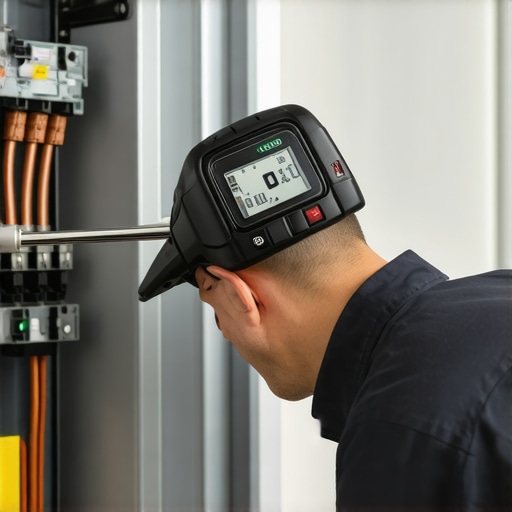 One mistake that even seasoned pros make is underestimating the physical stress of high-amperage heat. I’ve seen beautiful installations fail inspection—or worse, start smoking—because of a simple lack of precision. For instance, the conduit depth rule that fails more garage inspections than almost anything else isn’t just about protecting the wire from a shovel; it’s about heat dissipation. When wires are packed too tightly or buried too shallow, they can’t shed heat, and your ‘smart’ charger will see that resistance as a fault. You have to be obsessive about ensuring code compliance when installing ev chargers, particularly regarding the specific torque settings that prevent panel fires. A loose lug is a heat source, and heat is the enemy of charging speed. Have you ever fallen into the trap of thinking ‘hand-tight’ was enough? Let me know in the comments.
I don’t just rely on ‘feel’ anymore. I bought a FLIR thermal camera—the one that plugs right into my phone—and it changed how I look at my garage. Every few months, I plug the car in, wait an hour, and then scan the breaker. If I see a glowing purple-hot spot, I know I’ve got a problem before the smell of ozone hits. This kind of proactive monitoring is how you avoid 3 signs your main breaker is running dangerously hot. Beyond the camera, my most used tool is a calibrated torque screwdriver. You can’t guess 50 inch-pounds. When you are troubleshooting ev chargers common compliance pitfalls and fixes, you realize that thermal expansion is a constant cycle of loosening and tightening wires.
How do I maintain my charging setup over the long haul?
It is not a set-it-and-forget-it appliance like a toaster. I recommend a bi-annual checkup. First, inspect the charging handle for any pitting or carbon buildup on the pins—that is a recipe for a melted port. Second, if you are outdoors, you need to be doing specific maintenance tasks that keep your outdoor charger running through winter, like checking the gaskets for moisture ingress. Finally, re-verify your connections. The NFPA 70 National Electrical Code (NEC) 2023 edition, Section 110.14(D), explicitly requires the use of a calibrated torque tool for terminals where a torque is indicated on the equipment. This isn’t just a suggestion; it is a safety mandate to prevent high-resistance connections from starting fires during 10-hour charging sessions.

Your Panel Needs a Brain Not Just More Amps
Looking ahead, we are moving toward ‘energy-aware’ homes. I am already seeing homeowners install smart panels that can dynamically adjust loads without needing a five-thousand-dollar service upgrade. Learning how to load balance your home electrical system without a full panel swap is going to be the standard skill for every EV owner by 2030. You won’t just be plugging in a car; you will be managing a microgrid. If you want to stay ahead of the curve, do this one thing tonight: Open your electrical panel safely and look for any discoloration on the wires leading to your EV breaker. If the insulation looks crispy or brown, you have a high-resistance connection that is currently stealing your charging speed. Take a photo and contact us for a professional look before it fails completely. Getting your ev charger troubleshooting expert tips ready now saves a massive headache later.
The Hardest Lessons I Learned Managing My Own Garage Power
Looking back at my 2 AM realization in the garage, I wish I had known that the ‘smart’ in smart chargers is only as good as the physical foundation they sit on. I used to think that software could solve everything, but the biggest hurdle is often the physical environment. One of my biggest lightbulb moments was realizing that the difference between copper and aluminum wiring can be the deciding factor in whether your unit stays cool or throttles itself to death. Aluminum expands differently under load, and for high-amperage EV circuits, that movement can lead to the very loose connections that trigger a smart charger’s safety sensors. I also learned that code compliance essentials for ev charger installations aren’t just red tape; they are literally the performance specs for your home. If you ignore the small details, like the specific air gap around the unit or the exact conduit material, you are essentially building a speed limit into your own system. Finally, I realized that firmware updates are a double-edged sword; always check the release notes to ensure they don’t reset your custom amperage limits to a safer, slower default.
My Go-To Tools for a Stress-Free Charging Setup
I don’t go into any panel without my personal toolkit, and you shouldn’t either if you want to maintain peak efficiency. First is a thermal imaging camera—even a cheap one for your smartphone. It reveals invisible heat before it becomes a fire hazard or a throttling issue. Second is a calibrated torque screwdriver; as I mentioned earlier, guessing the tightness of a lug is the fastest way to fail an inspection or melt a breaker. Third, I highly recommend keeping a copy of the latest NEC handbook or a simplified guide for your local jurisdiction. If you find yourself in over your head, it is always best to know how to find an electrician who actually understands ev codes rather than hiring a generalist who might miss the nuances of high-duty-cycle loads. I trust these tools because they remove the guesswork and keep my EV charger running at the full 48 amps I paid for.
Taking Control of Your Home’s Energy Future
Transitioning to an electric vehicle is more than just a car purchase; it is an upgrade to your lifestyle and your home’s technical capability. By taking the time to master your EV charger settings and respecting the rules of code compliance, you’re not just fixing a slow charge—you are future-proofing your property. Don’t be intimidated by the wires and the apps. Every bit of troubleshooting you do today makes you a more capable energy manager for the high-tech home of tomorrow. If you hit a wall, remember that a panel upgrade isn’t always a defeat; sometimes it’s the necessary foundation for the power you need. You have the tools and the knowledge now to stop the throttling and start enjoying the full speed of your investment. Have you ever discovered a loose wire or a hot breaker while inspecting your own setup? Let me know your discoveries in the comments below.